> ## Documentation Index
> Fetch the complete documentation index at: https://docs.tc.xyz/llms.txt
> Use this file to discover all available pages before exploring further.
# Your first trade
> Open your first TrueCurrent perpetuals position: choose a market, set margin and leverage, review your worst price, and monitor liquidation risk.
This walkthrough shows the basic flow for opening a first position on TrueCurrent. Start with a small size and low leverage while you learn how margin, price tolerance, funding, and liquidation behave.
***
## Before you start
Make sure you've:
* Connected your wallet ([guide](/getting-started/connect-wallet))
* Completed the one-time authorization (prompted automatically on first visit)
* Deposited USDC ([guide](/getting-started/deposit-funds))
***
## Step 1: Choose a market
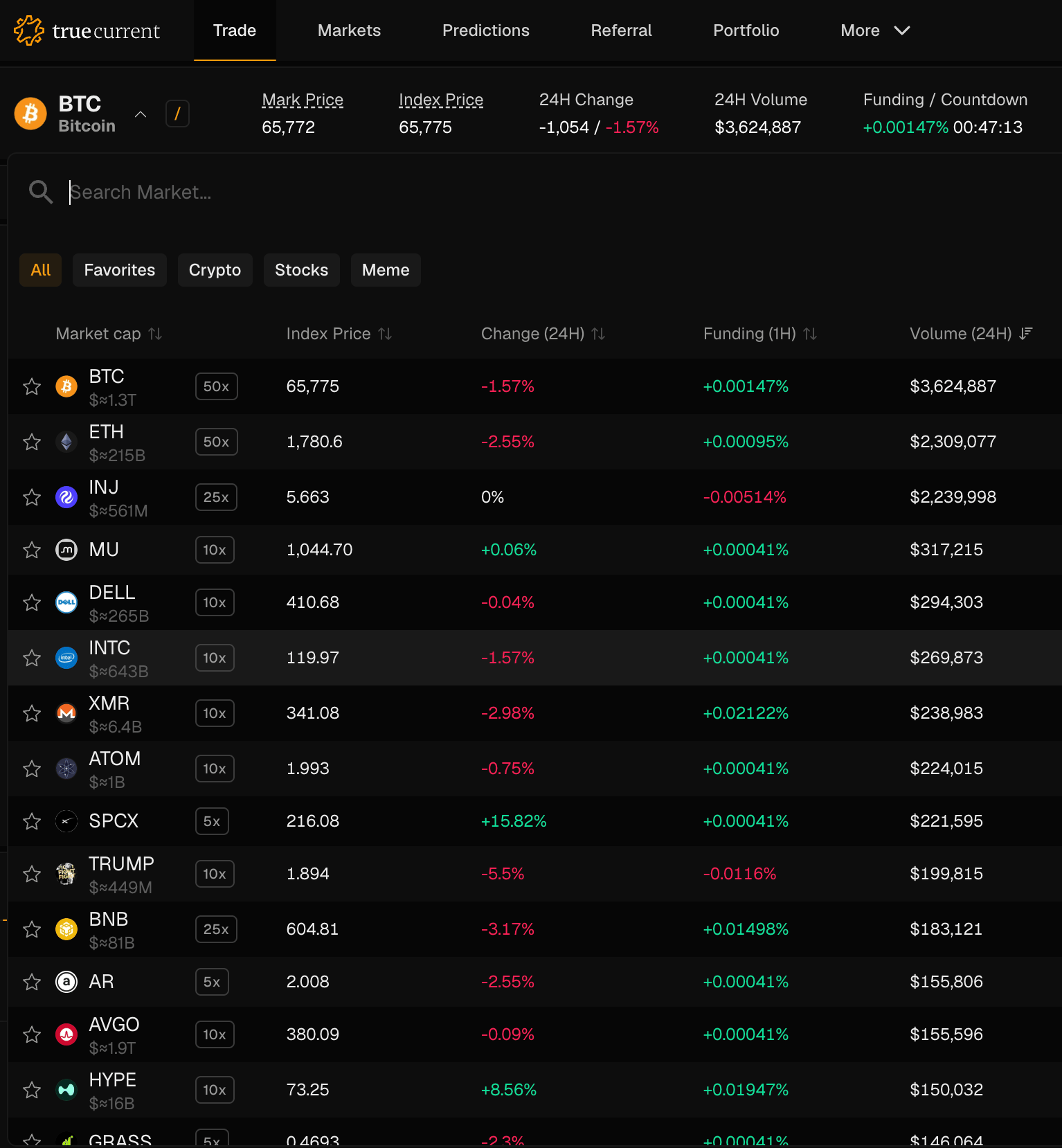
From the markets dropdown, select the market you want to trade. Each market shows the last traded price, 24h volume, and funding rate.
 ***
## Step 2: Long or short?
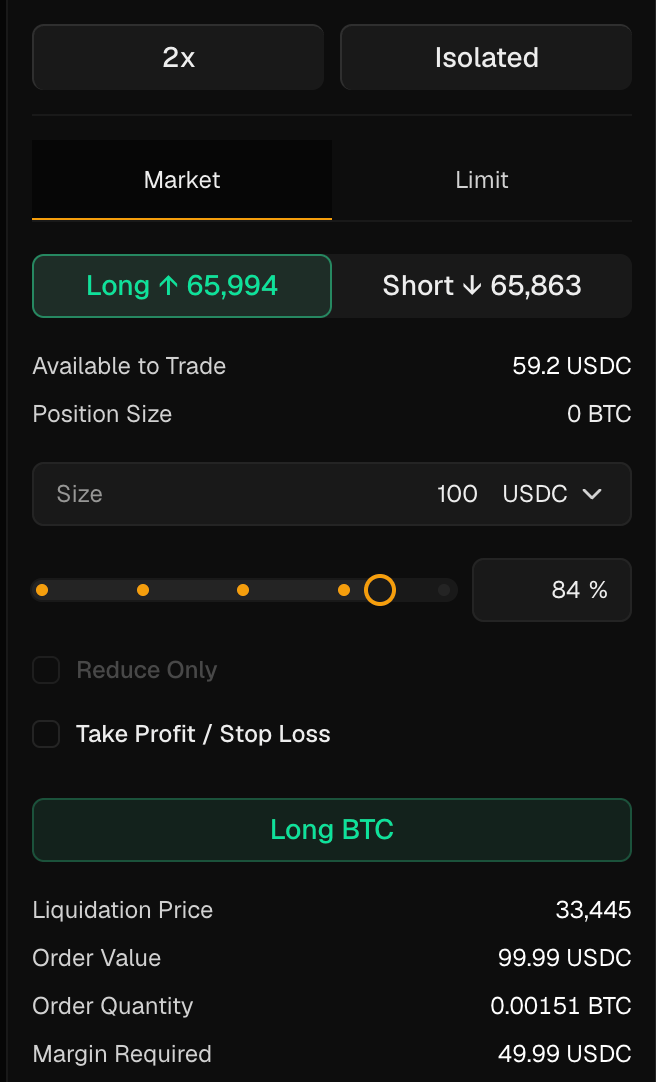
**Long** – you profit if the price goes up.
**Short** – you profit if the price goes down.
***
## Step 3: Set your size and leverage
Enter the **amount of USDC** you want to use as margin (your collateral). Then set your leverage – this determines the size of your position relative to your margin.
For example, 100 USDC margin at 2x leverage means a 200 USDC position. A 10% price move in your favor results in a 20 USDC profit (20% on your margin). A 10% adverse move results in a 20 USDC loss.
Higher leverage amplifies both gains and losses. Beware of the risks associated with high leverage.
***
## Step 2: Long or short?
**Long** – you profit if the price goes up.
**Short** – you profit if the price goes down.
***
## Step 3: Set your size and leverage
Enter the **amount of USDC** you want to use as margin (your collateral). Then set your leverage – this determines the size of your position relative to your margin.
For example, 100 USDC margin at 2x leverage means a 200 USDC position. A 10% price move in your favor results in a 20 USDC profit (20% on your margin). A 10% adverse move results in a 20 USDC loss.
Higher leverage amplifies both gains and losses. Beware of the risks associated with high leverage.
 ***
## Step 4: Set your price tolerance
Before confirming, you'll see a **quoted price** and a **slippage amount**. TrueCurrent converts these into a **worst price**: the highest price you will pay when going long, or the lowest price you will receive when going short.
For example, if BTC is currently quoting at \$100,000 and your slippage tolerance is set to 0.25%, you will not get filled on a long above \$100,250.
TrueCurrent will not settle your trade at a price worse than this limit. If no liquidity provider can satisfy it, the trade does not execute.
***
## Step 5: Review and submit
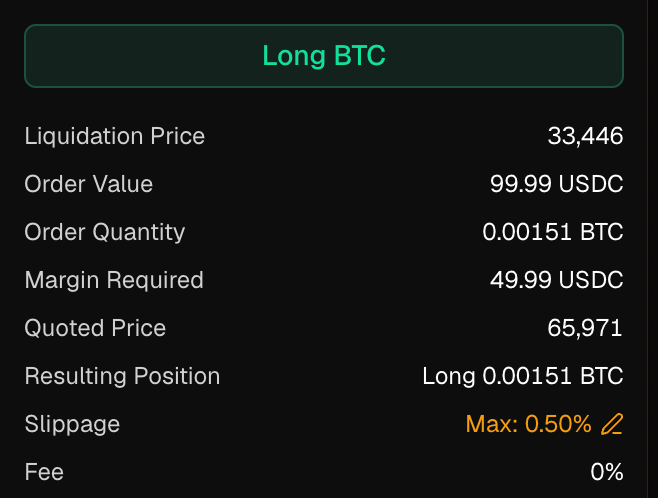
Review the trade summary at the bottom of the panel: **Quoted Price**, **Resulting Position**, **Slippage** (your worst price), **Order Value**, **Margin Required**, and **Liquidation Price**.
When you're ready, click **Long \[asset]** or **Short \[asset]**. TrueCurrent automatically collects prices from institutional liquidity providers, picks the best one, and executes your trade – all in under a second. You'll see a confirmation toast once the trade settles.
***
## Step 4: Set your price tolerance
Before confirming, you'll see a **quoted price** and a **slippage amount**. TrueCurrent converts these into a **worst price**: the highest price you will pay when going long, or the lowest price you will receive when going short.
For example, if BTC is currently quoting at \$100,000 and your slippage tolerance is set to 0.25%, you will not get filled on a long above \$100,250.
TrueCurrent will not settle your trade at a price worse than this limit. If no liquidity provider can satisfy it, the trade does not execute.
***
## Step 5: Review and submit
Review the trade summary at the bottom of the panel: **Quoted Price**, **Resulting Position**, **Slippage** (your worst price), **Order Value**, **Margin Required**, and **Liquidation Price**.
When you're ready, click **Long \[asset]** or **Short \[asset]**. TrueCurrent automatically collects prices from institutional liquidity providers, picks the best one, and executes your trade – all in under a second. You'll see a confirmation toast once the trade settles.
 ***
## Step 6: Monitor your position
Your open position appears in the **Positions** panel below the chart. You'll see:
* Entry price and current **Index Price**
* Unrealized P\&L
* Your **liquidation price** – if the mark price reaches this level, your position can be forcibly closed
***
## Step 6: Monitor your position
Your open position appears in the **Positions** panel below the chart. You'll see:
* Entry price and current **Index Price**
* Unrealized P\&L
* Your **liquidation price** – if the mark price reaches this level, your position can be forcibly closed
 ***
## Closing your position
Click **Close** on any open position. Choose full or partial close and confirm.
***
## Tips
**Watch your liquidation price.** If you're getting close, you can add margin or partially close to reduce risk.
**Check funding rates.** If you're holding a position for long periods of time, funding payments can add up. See [Funding rates](/trading/funding-rates).
***
## Closing your position
Click **Close** on any open position. Choose full or partial close and confirm.
***
## Tips
**Watch your liquidation price.** If you're getting close, you can add margin or partially close to reduce risk.
**Check funding rates.** If you're holding a position for long periods of time, funding payments can add up. See [Funding rates](/trading/funding-rates).